In this section, you can easily manage customer feedback by viewing and responding to reviews directly. Regularly checking and replying to customer reviews helps build trust, improve your brand image, and show customers that you value their opinions. Positive responses can strengthen customer relationships, while addressing negative reviews politely can help maintain a good reputation.
By clicking the “Get More Reviews” button, you can create a short, shareable link that encourages customers to leave feedback.
This link can be shared through WhatsApp, email, or social media to request reviews from your satisfied customers.
Imagine you own an ice cream shop. A customer might write, “I had bought an ice cream from this shop, and it was delicious!” When you respond to such reviews — for example, “Thank you for your kind words! We’re glad you enjoyed the ice cream. Hope to see you again!” — adding your products and services keywords in responses help attract more new customers and increase engagement on your Google Business Profile.
You can also access this page from “Ask for Review” in the main page of business profile listing.
Clicking this option will guide you to a referral link page, similar to the one found under “Read Reviews.”
By selecting the links for email, WhatsApp, or Facebook, a review request is automatically populated, allowing easy sharing with your customers.
Share Your Reviews QR Code
You can also share your review QR code with customers, making it even easier for them to leave feedback. Simply right-click the QR code below to save the image and share it directly with your customers.
Before utilizing any direct messaging options (such as email or WhatsApp), ensure that you have received explicit consent from your customers to contact them through these channels.
Photos Updation
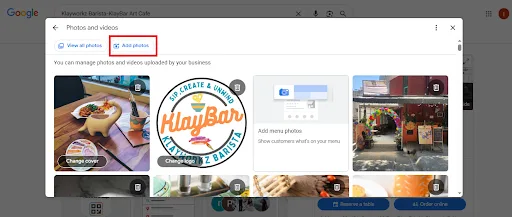
Add Logo, Cover Image, and Photos
The visual aspects of your Google Business Profile play an essential role in creating a professional, trustworthy, and engaging business presence. By adding your business logo, a cover photo, and other relevant photos, you can make your profile more appealing to potential customers. These images also enhance your local SEO and overall digital marketing strategy, increasing your chances of standing out in search results and attracting more visitors.
Before utilizing any direct messaging options (such as email or WhatsApp), ensure that you have received explicit consent from your customers to contact them through these channels.
Business Logo
Your business logo is one of the most important visual elements for your Google Business Profile. It represents your brand and helps customers instantly recognize your business.
Cover Image
Your cover photo is the first image customers see when they find your business on Google. This image visually represents your business and sets the tone for potential customers.
Additional Photos
In addition to your logo and cover photo, adding other relevant photos is a great way to showcase your business’s services, products, and atmosphere.
GBP Posts Management:
The “Posts” section in your Google Business Profile (GBP) refers to creating Google posts, which are essential for engaging with potential customers and keeping your profile active. Posting regular updates about your business can help increase visibility, inform customers about promotions, and improve local SEO.
Add Post
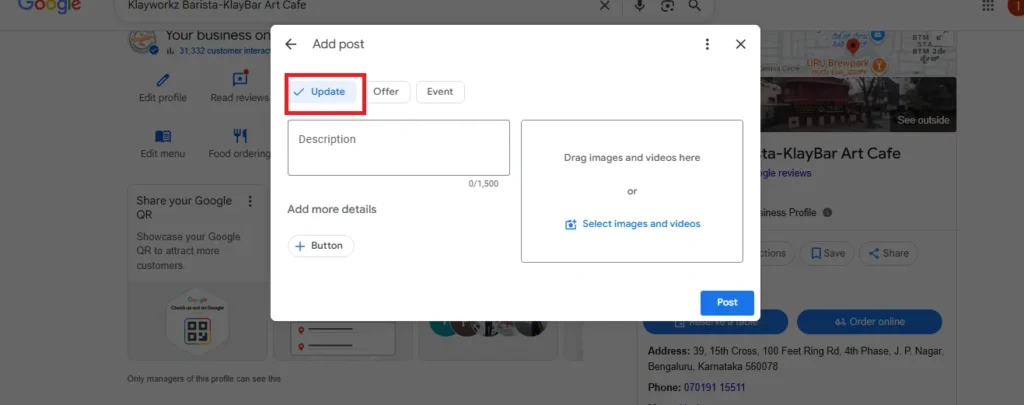
Add posts are used to share general updates, news, or announcements about your business. Click here to create a new post by adding posts
Update Post
Update posts are used to update about the new products or new services or any new information you wanted to communicate to your customers. Click here to do “Update” post.
Character Limitations:
Text Limit: 1,500 characters (however, only the first 100-150 characters appear in the preview, so try to keep important information within the first 100 characters).
Image Limit: 1 image or video (max 10 MB).
CTA Options: You can add a button like “Learn More” or “Call Now” in this section.
Event Post
Event posts are used to promote an upcoming event, workshop, or other special occasions at your business. This type of post can help you attract customers to specific events like grand openings, special promotions, or themed nights.
Click here to create new event post.
Character Limitations:
Text Limit: 1,500 characters (similar to updates, but only the first 100-150 characters are visible in the preview).
Event Title: Up to 58 characters (this is the title of your event).
Event Description: Up to 1,500 characters.
Start and End Date: You must specify a start and end time (this helps in displaying the event properly).
Image Limit: 1 image or video (max 10 MB).
CTA Options: You can add a “Sign Up,” “Learn More,” or other relevant buttons that lead to event registration pages or details.
Offer Post
Offer posts are used to share special promotions, discounts, or sales that you are running. This post type is perfect for letting your customers know about limited-time offers, bundle deals, or exclusive discounts.
Click here to create new offer post
Character Limitations:
Text Limit: 1,500 characters.
Offer Title: Up to 58 characters.
Offer Details: 1,500 characters.
Start and End Date: Required for offers (this is used to specify the limited-time nature of the offer).
Image Limit: 1 image or video (max 10 MB).
CTA Options: Options include “Claim Offer,” “Order Now,” “Learn More,” etc. Make sure your CTA directs customers to where they can redeem the offer (website, store, etc.).
By posting these regular updates using the Google Business Profile, you keep your customers engaged, increase your visibility in local search results, and enhance your overall local SEO efforts.
How to check Performance in Google Business Profile (GBP)
The Performance section (previously called “Insights”) provides a powerful analytics dashboard that helps business owners understand how customers are interacting with their Google Business Profile. Monitoring this section allows you to track results, optimize your listing, and make informed marketing decisions.
Purpose of the Performance Section
Track how users interact with your profile in real time.
Identify strong-performing services to promote more.
Discover trending search terms to enhance content marketing SEO.
Justify digital investments with measurable outcomes using AI-powered digital marketing.
Refine your ecommerce digital marketing strategy or social media management tools based on actual data.
Key Features Explained in Detail
Overview
This feature shows how many actions users have interacted with your business —like clicking to call, getting directions, or visiting your website. These metrics are crucial for assessing local digital marketing services and optimizing seo tools. From this year, you can click on the old year to view the customer interactions, enabling year-over-year performance comparisons for better analysis.
+17.7%: This shows the growth in interactions with your profile over the selected time period. Specifically, it means that the number of interactions has increased by 17.7% compared to the same month in the previous year (e.g., May 2025 compared to May 2024).
What Does This Metric Tell You?
This percentage increase indicates a positive trend in customer engagement with your business profile. A +17.7% increase suggests that more people are discovering your business, interacting with your listing, and potentially becoming customers.
This is a good indicator that your profile is gaining more visibility and your local SEO efforts (including accurate business information, reviews, and regular updates) are likely contributing to this growth.
“Menu” Section under the Performance Tab
The “Menu” section under the Performance tab shows how many people viewed or interacted with your menu. This helps track customer interest and optimize your local SEO strategy.
In this case, 10,803 people have viewed your menu content, indicating a solid level of interest and engagement with the products or services listed on your Google Business Profile.
Calls under the Performance Tab
The “Calls” section under the performance tab tracks the number of calls made directly from your profile. In the screenshot, 2,268 calls were made from June to November 2025, with a peak of 449 calls in August 2025, showing a spike in customer engagement during that month.
This data helps assess the success of your local SEO and marketing efforts by tracking how many customers are reaching out. Analyzing call trends allows you to optimize digital marketing strategies to increase engagement and improve your profile’s visibility.
Chat Clicks in Google Business Profile
The Chat Clicks metric in your Google Business Profile shows how many times customers clicked on the chat option to message your business directly. Between June 2025 and November 2025, your profile received 239 chat clicks, reflecting strong customer engagement through Google Search and Maps.
Bookings in Google Business Profile
The “Bookings” section under the Performance tab in Google Business Profile tracks the number of appointments or reservations made directly from your profile. In the screenshot you provided, 302 bookings were made between June 2025 and November 2025, with a peak of 54 bookings in September 2025. This data reflects customer engagement with your business’s booking functionality, showing how many users clicked to schedule appointments or reserve a spot directly through your profile.
Directions in Google Business Profile
The “Directions” metric in Google Business Profile tracks the number of times users request directions to your business directly from your profile. This feature is especially important for businesses with a physical location, as it shows how many people are actively using Google Maps to find their way to your business.
For example, 13,800 direction requests were made from June 2025 to November 2025, with a peak of 2,428 requests in October 2025, indicating a significant increase in customer interest during that month. The more direction requests you receive, the higher the chances that customers will visit your location in person, increasing potential sales and engagement.
Website Clicks in Google Business Profile
The “Website Clicks” metric under the Performance tab tracks the number of times users click on the website link in your Google Business Profile to visit your website. This metric provides valuable insight into how effectively your profile is driving traffic to your website.
For example, in the screenshot, your profile received a total of 1,602 website clicks from June 2025 to November 2025, with 309 clicks in October 2025, indicating a peak of customer interest during that month.
Search Terms Google displays the actual phrases people searched that led them to your business. Ideal for refining your seo optimization tools, adjusting campaigns with social media and reputation management, or updating product-specific content marketing and seo strategies.
Historical Data Access With the latest update, users can now access previous year’s data easily. This aids in comparing growth, identifying seasonal trends, and adapting your digital advertising solutions for better results.
How People Discovered You:
This section in your Google Business Profile shows how many people have viewed your business profile on Google Search and Google Maps. It provides a clear view of visibility trends and the effectiveness of your profile in attracting customers. It’s an essential tool for local SEO and digital marketing, helping you evaluate how well your business is performing in organic search results.
How to Use This Data Effectively:
Optimize for Mobile: If most customers are finding your business through mobile devices, ensure your website is fully optimized for mobile, offering fast loading times and an easy-to-navigate interface.
Refine SEO Strategy: By reviewing search term insights from the Performance Section, you can identify which keywords are driving traffic to your profile and refine your SEO digital marketing strategy accordingly.
Boost Visibility During Peak Times: If you see a spike in profile views, it’s an opportunity to capitalize on this increased interest by posting special offers, promotions, or events to keep the momentum going.