

Up next:
Review Management


Your Google Business Profile (GBP) is a powerful tool for managing your online presence on Google Search and Google Maps.
The Edit Profile section is where you can update key business information to ensure it’s always accurate and up-to-date, improving your visibility and engagement with potential customers. Let’s walk through the various sections you can edit:

The Business Information section is one of the most crucial parts of your Google Business Profile (GBP). Here’s a breakdown of each key element:

Your business name should match exactly how your business is recognized in the real world. This is how customers search for you and how they identify your brand. Consistency across Google Business Profile, social media, and other online platforms is critical for local SEO and building brand recognition.

Only include keywords in your business name if they are officially part of your registered business name. For example, “Klayworkz Barista – KlayBar Art Cafe” is correct, but “Klayworkz Barista – Best Art Cafe in Town” is not, because it adds extra keywords that are not part of the official name.
The business category defines your business’s core function and plays a crucial role in ensuring your business appears in the right search results. Google uses the category to match your business with relevant customer searches, improving your local SEO and increasing your visibility to potential customers.

Selecting the right category for your business is vital because it helps Google understand your services and products. This helps ensure that your business is displayed to users who are searching for businesses in your specific area, industry, or niche.
For example, if someone searches for “best restaurants near me,” Google will use the restaurant category to show relevant results. The more accurate the category, the better your chances of appearing in the right search results for local customers.
Choosing the most accurate and specific category is key to ensuring that your business is properly categorized. The primary category should best represent the core service or product that your business offers. Even if your business provides multiple services, it’s important to focus on the one that defines your business.
For Example:
By carefully selecting the most appropriate categories, you increase the chances of local customers finding your business and engaging with your services.
The business description section allows you to tell potential customers about your business, what you offer, and why they should choose you. This is your chance to showcase what sets you apart from your competitors and to highlight your products or services.
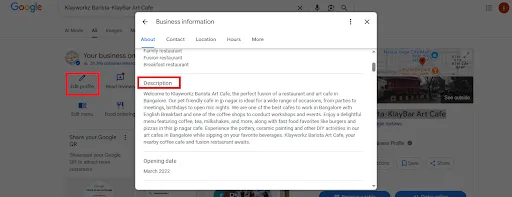
The opening date refers to when your business officially began. This information adds credibility to your Google Business Profile and can show potential customers how long you’ve been in operation.

The Contact Information section of your Google Business Profile is where you can manage the core details that customers use to contact your business. Accurate and up-to-date contact information improves your local SEO and makes it easier for potential customers to find, call, and visit your business.

Your business phone number is one of the most critical aspects of your contact information. Customers who see a phone number listed on your Google profile are more likely to call for further inquiries or to make a booking.

There is an option to add whatsapp or sms number so that your customers can contact you. For watsapp option, enter the phone number in the form of url like this “https://wa.me/+91“

Your website URL is a key part of your Google Business Profile, directing users to more information about your services, products, and business operations. Ensuring this URL is up-to-date ensures customers can easily access your online presence.

The Location & Areas section of your Google Business Profile (GBP) is crucial for businesses, whether you have a physical storefront or offer services in specific geographical regions.

The business address is the physical location where your business operates. If you serve customers at a physical storefront, office, or another business location, this is where you can add your full address. This information allows Google to map your business correctly and helps customers find directions and contact you easily.

The map pin represents the location of your business on Google Maps. While the business address is critical, sometimes the pin may not be placed correctly, especially in complex locations like shopping centers or buildings with multiple units.

By manually repositioning the pin to match your actual location, you ensure that your customers can easily navigate to your storefront, which leads to better customer satisfaction and improved search rankings.
For businesses that do not have a physical location where customers visit (e.g., delivery services, home repairs, or mobile services), the Service Areas feature is essential. It allows you to specify the regions, cities, or neighborhoods where you provide services.

Enter the regular business hours, as well as special hours for holidays and events in this section

Accessibility
If your business caters to people with disabilities or those who require special assistance, it’s essential to provide this information in the Accessibility section. It shows your commitment to inclusivity and can help attract customers who have specific accessibility needs.

Amenities
This section allows you to highlight the amenities that your business provides, making it easier for customers to decide if your business is a good fit for their needs. Amenities might include things like parking, free Wi-Fi, or pet-friendly policies.

Child-Friendly Services
If your business is family-oriented, especially for customers with children, you can include information on the child-friendly services you provide. This helps attract parents who are looking for businesses that cater to children’s needs.

Crowd Types
If your business experiences different types of crowd, such as large groups, families, or solo visitors, you can share this information. This is especially useful for businesses like restaurants, event venues, or tourist attractions, where the type of crowd can affect the customer experience.

If your business offers event planning services or is available to host events, be sure to include these details. Many customers look for venues that can host events like weddings, meetings, parties, or conferences.

You can either use the tabs at the top to navigate or scroll through the page to access and modify all editable fields.
By accurately managing and regularly updating your Additional Information, you make your Google Business Profile more appealing to customers and improve its chances of showing up in local searches. This not only enhances customer engagement but also strengthens your local SEO, leading to higher visibility and more customer conversions.