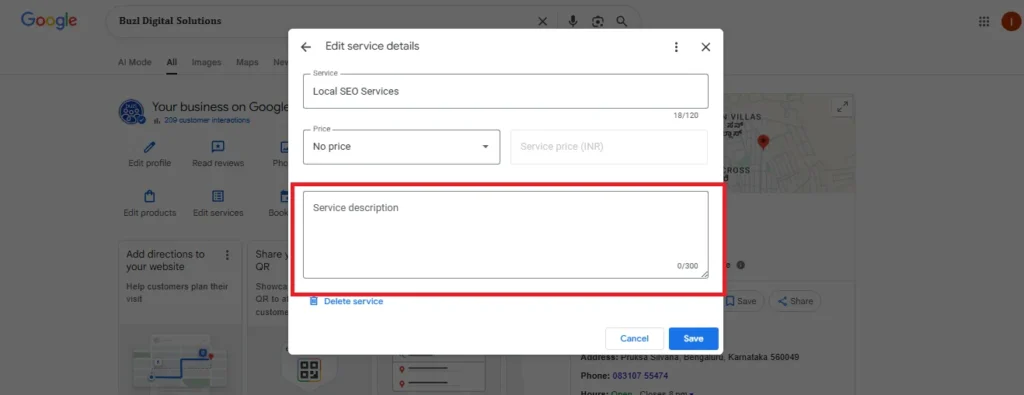
Keeping your Google Business Profile (GBP) updated is one of the most important parts of maintaining a strong online presence. The “Edit Services” section allows business owners to clearly list all the services they provide. This helps potential customers understand what your business offers before contacting you, increasing your chances of getting more leads and conversions.
Add Another Business Category
The “Add another business category” feature allows you to select additional categories for your business, which helps improve its visibility in relevant search results. This is especially useful if your business offers multiple services or falls into more than one industry. For example, if you offer digital marketing services as well as website creation, adding both as categories will help you appear in more specific search queries.
Purpose of This Section:
The “Add Business Category” feature allows you to expand or adjust the categories associated with your business on Google. Categories help Google understand what your business is about and determine which searches it should appear for. This directly impacts your visibility in Google search results and maps.
Why Is Adding Multiple Categories Important?
Increased Visibility:
Google uses your business categories to determine which search queries your business should appear for. By adding relevant categories, your business has the potential to show up for a wider variety of search terms.
For example, by adding “SEO Services”, “Google Ads”, and “Website Creation”, your business becomes visible to customers who search for those specific services.
Accurate Representation of Your Services:
Listing multiple categories ensures that Google knows exactly what your business offers. This helps Google match your business to the right queries, improving the chances of being found by potential customers looking for those services.
Better SEO:
Using the right categories helps optimize your Google Business Profile for local SEO. Google associates your business with the right industries, improving your search ranking for those services.
Why Editing Services Is Important
An accurate and up-to-date list of services builds trust with customers and helps Google match your profile with the right search queries. For example, if you run a salon and recently added a new service like “Hair Spa,” updating it in your GBP ensures that people searching for that service can find you easily.
What You Can Do in the “Edit Services” Section
Add New Services
You can include any new services that your business has introduced.
Adding new services helps your business appear for more relevant searches and makes your profile more informative.
Example: If you own a laundry service, you can add new offerings such as “Shoe Cleaning” or “Dry Cleaning for Curtains.”
2. Update Existing Services
Modify existing service names, descriptions, or prices whenever there’s a change.
Keeping this information current ensures customers always see accurate details about what you offer.
Example: If your pricing or service time changes, you can quickly update those details.
Remove Unavailable Services
Service Description Guidelines
When adding or editing services, Google allows you to provide a short description to help customers understand what each service includes.
Character Limit: Each service description can be up to 300 characters long. Keep your description short, clear, and informative.
Best Practices for Writing Descriptions:
Start with the main keyword (the service name).
Use relevant keywords to improve local SEO and match potential customer searches.
Briefly explain what the service includes.
Mention any special features, benefits, or offers.
Avoid using promotional language like “Best” or “#1,” as Google prefers factual and helpful content.
Benefits of Keeping Services Updated
Improves visibility in local search results.
Builds trust and transparency with customers.
Ensures your business appears for the right keywords and searches.
Makes your Google Business Profile look more professional and complete.
Regularly reviewing your services helps your business stay competitive and ensures that customers always have accurate information about what you offer.